This documentation is for a deprecated version. For the latest version, please refer to: https://wiki.zondavirtual.com/api/IFP_iFrame_Communication_API
This API v1.4 create a safe cross-origin communication between the Alphaplan embeded and the main page via Window.postMessage().
It is in the form of JavaScript library you include in your own code.
<script type="text/javascript" src="https://apps.zondavirtual.com/api/vpsAPIv1.4.js"></script> ¶ Initialization
Declare an API variable. This will Initialize the cross-origin communication. The variable will be used later for all other function calls.
¶ IFrame Object
<iframe id="vpsIframe1" style="height: 100%;width:100%" src="https://apps.zondavirtual.com/alphaplan/index.html?plan=954ee11f-62d2-426b-8631-5869cd3180ec" onload="iframeLoaded(event)"></iframe>The alphaplan link need to be set as the source of the IFrame. The API takes some time to initialize once initialized an event is sent to call back function.
¶ Parameters:
- IFrame*: Reference DOM element or element string id.
- CallBackFunctionName* : Global call back function name.
Those marked with* are mandatory.
function iframeLoaded(event)
{
	vpsApi = new VpsApi(document.getElementById("vpsIframe1"),"vpsApiCallback");
}¶ Message ID returns
- "S_001" : “Success”
- "S_002" : “Alphaplan API connected to [IFrameId]”
- "S_003" : “Alphaplan Loaded!”
- "E_001" : “IFrame [IFrameId] doesn't exist ”
- "E_002" : "[FunctionName]() is not defined."
- "E_003" : "Javascript Error : [Error Message]"
- "E_004" : "Window is not defined, impossible to post the message"
- "E_005" : "VPSAPI can not called the function [FunctionName] because the connection with the VPS is not established"
- "E_006" : "Bad options : [OptionId]."
- "E_007" : "The callback activity function is not setted or doesn't exist."
- "E_008" : "Connection is not established yet with the iframe [IFrameId]."
- "E_009" : "The module [ModuleName] doesn't exist or isn't available."
- "E_010" : "Session Id is required to save the plan configuration."
- "E_011" : "User Id is mandatory to load plan configuration."
- "E_012" : "Unable to delete, not logged in or no save available."
¶ Console Errors:

IFrame container is undefined. Review the Iframe parameter.

API initialization is not finished.
¶ Modules
¶ Modules List
Contain the list of each module available in the plan. This returns an array of moduleID (string).
vpsApi.modulesList

¶ Show Module
- vpsApi.showModule(value) : Display a specific module (Switch tab). There are multiple ways to switch module :
vpsApi.showModule("elevation"); // ModuleID
vpsApi.showModule(VPSAPI_MODULE.EXPLORE); // Enum
vpsApi.showModule(2); // Index
vpsApi.modules.elevation.load(); // Object
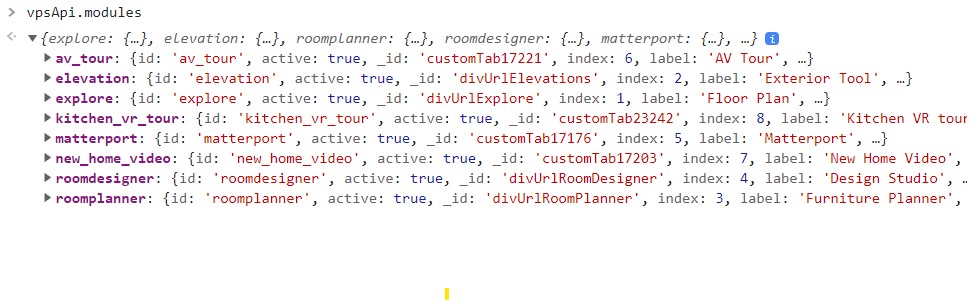
¶ Module Object
- Variables
- id: Unique id of the module.
- label: Title of the module
- index: Order of the module displayed in the alphaplan
- active: Module is available in the alphaplan
- Functions
- load(): Function to load the module in the alphaplan
¶ Static Modules
When the module variable is undefined, the module is not available for this particular plan.
- explore : Same as Floor Plan module
vpsApi.modules.explore
vpsApi.modules["explore"]
vpsApi.modules[VPSAPI_MODULE.EXPLORE]
- elevation
vpsApi.modules.elevation
vpsApi.modules["elevation"]
vpsApi.modules[VPSAPI_MODULE.ELEVATION]
- roomplanner
vpsApi.modules.roomplanner
vpsApi.modules["roomplanner"]
vpsApi.modules[VPSAPI_MODULE.ROOM_PLANNER]
- roomdesigner
vpsApi.modules.roomdesigner
vpsApi.modules["roomdesigner"]
vpsApi.modules[VPSAPI_MODULE.ROOM_DESIGNER]
¶ Custom module
The custom modules are defined in the CMS. The module ID is the label in lowercase with underscore instead of space.

vpsApiParent.modules.new_home_video;
¶ Saving API Call
- vpsApi.saveConfig(session,user,callback) : Save of the current user plan configuration.
vpsApi.saveConfig("3B06C65E-1B5A-A480-3127-B1072B8799FD","","callBackSaveFP");
vpsApi.saveConfig("3B06C65E-1B5A-A480-3127-B1072B8799FD","vps.api@alpha-vision.com","callBackSaveFP");
vpsApi.saveConfig("","vps.api@alpha-vision.com","callBackSaveFP");
- sessionId*: ID for the session
- userId*: ID for the user. Used to link saved configuration with a builder’s user. When provided, config data will be sent back to builder using Data sharing API.
- callBackSaveFP: Call back function. Used to get URL of saved configuration.
*userId or sessionId is mandatory.
¶ Return Plan Config URL.

¶ URL parameters.
If userId and sessionId are provided in the alphaplan link, the configuration will load automatically.
- sessionId: (Required). ID for the session.
- userId: (Optional). ID for the user. Used to link saved configuration with a builder’s user. When provided, config data will be sent back to builder using Data sharing API.
¶ Temp save concept.
When calling the saveFloorplan function without a userId this will create a temp save, linked only to the sessionId.
By appending a &userId parameter to the URL from the callback function the temp save will be converted to a normal save and assigned to the provided UserId.
¶ Other Available Functions
- vpsApi.printBrochure(callBackFunction); //Simply triggers the print process of the alphaplan.
- vpsApi.resetPlan(callBackFunction);
- vpsApi.loadConfig(userId,callBackFunction)
- vpsApi.reload(callBackFunction);
- vpsApi.showElevation(callBackFunction);
- vpsApi.showFloorplan(callBackFunction);
- vpsApi.showRoomPlanner(callBackFunction);
- vpsApi.setOptions(data,callBackFunction);
- vpsApi.setRestrictions(data,callBackFunction);
- vpsApi.setAvailables(data,callBackFunction);
- vpsApi.setFavorites(data,callBackFunction);
- vpsApi.getCurrentOptions (callBackFunction);
- vpsApi.setActivityFunction(activityFunction);
- vpsApi.deleteConfig(callBackFunction);
¶ Version History
- 1.4
- Modules object
- Show Module Function
- Rename loadOptions to loadConfig
- Rename saveFloorplan to saveConfig
- Add deleteConfig()
- 1.3
- Initial Release