The IFP Webapp Iframe Communication API (version 2.0.0) enables secure cross-origin communication between an embedded IFP (Interactive Floor Plan) web application and its parent page using the Window.postMessage() mechanism. This JavaScript library facilitates interaction with the IFP webapp.
¶ Overview
The API is provided as a JavaScript library that you include in your code. It requires an iframe to host the IFP webapp and initializes a communication channel between the parent page and the embedded application.
¶ Including the Library
Include the minified JavaScript library in your HTML:
<script type="text/javascript" src="https://apps.zondavirtual.com/api/webappIFP-2.0.min.js"></script> ¶ Demo Page
A demonstration of the API is available at: https://apps.zondavirtual.com/demo/webapp_communication/ifp/index.html
¶ Initialization
To use the API, initialize it by creating an instance of ZONDA.WebappIFPApi with a reference to the iframe hosting the IFP webapp and a callback function to handle initialization results.
¶ Iframe Setup
The IFP webapp must be loaded in an iframe. Set the iframe's src attribute to the IFP application URL, which typically includes a plan ID. For example:
<iframe id="ifpIframe" style="height: 100%;width:100%" src="https://apps.zondavirtual.com/alphaplan/index.html?plan=a6b427e1-1ad0-4d27-b2ba-2c3efa11522b" onload="iframeLoaded(event)"></iframe>The API requires time to initialize as it waits for the IFP webapp to load. During this period, you can display a placeholder image or a gray background (as shown in the demo) to improve the user experience. Once initialization is complete, the specified callback function is invoked with a success or error message.
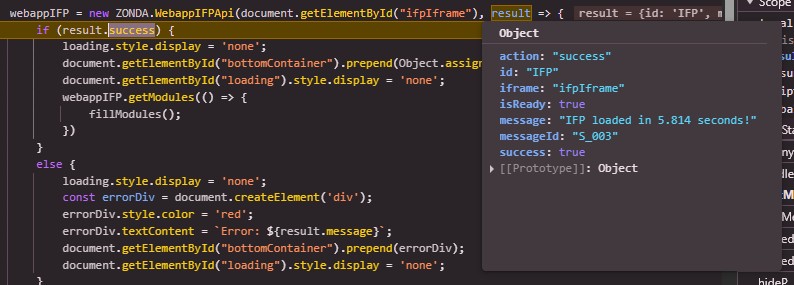
You can confirm that the connection has been successfully established by observing the following messages in the browser console:
- Loading: Loading IFP Webapp IFrame Communication API v2.0.1...
- Success: [SUCCESS] IFP API connected to IFP application via iframe [ifpIframe] in 1.254 seconds.
¶ Parameters
- IFrame* (DOM Element or String): A reference to the iframe DOM element or its ID.
- CallbackFunction (Function): A callback function to handle initialization results.
Parameters marked with an asterisk () are mandatory.
¶ Example Initialization
var webappIFP;

var iframeLoaded = (e) => {
    webappIFP = new ZONDA.WebappIFPApi(document.getElementById("ifpIframe"), (result) => {
        if (result.success) {
            console.log(result.message); // e.g., "api loaded in 5.814 sec"
            webappIFP.getModules(() => {
                console.log(webappIFP.modules); // Log available modules
            });
        } else {
            console.log(result.message); // e.g., "error message"
        }
    });
};¶ Available Variables
The following instance variables are available on a WebappIFPApi object after initialization:
- iframe (DOM Element): The iframe element hosting the IFP webapp, passed during initialization.
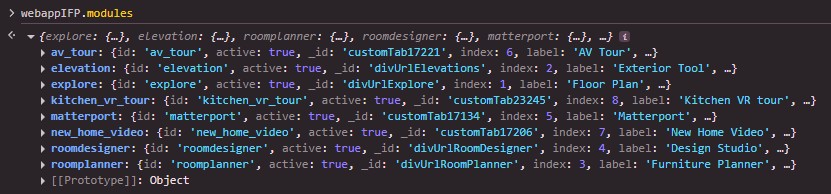
- modules (Object): An object containing the available modules retrieved via getModules(). Each module includes a load() method to display it.
- webappUrl (String): The URL of the IFP webapp loaded in the iframe.
- name (String): The API identifier, set to "IFP Webapp IFrame Communication API v2.0.0"
¶ Available Functions
List of instance methods available after initializing the WebappIFPApi.
- deleteConfig(callbackFunc)
- getCurrentOptions(callbackFunc)
- getModules(callbackFunc)
- getStaticModules(callbackFunc)
- loadConfig(userId, callbackFunc)
- printBrochure(callbackFunc)
- ready(callbackFunc)
- reload(callbackFunc)
- resetPlan(callbackFunc)
- saveConfig(sessionId, userId, callbackFunc)
- setActivityFunction(activityCallback)
- setAvailables(data, callbackFunc)
- setFavoriteCallback(callbackFunc)
- setFavorites(data, callbackFunc)
- setOptionCallback(callbackFunc)
- setOptions(data, callbackFunc)
- setRestrictions(data, callbackFunc)
- showElevation(callbackFunc)
- showFloorplan(callbackFunc)
- showRoomDesigner(callbackFunc)
- showRoomPlanner(callbackFunc)
- showModule(moduleId, callbackFunc): This function can be called in different ways, as shown in the screenshot below, where “elevation” is the module ID and “2” is the module index, with other supporting functions.
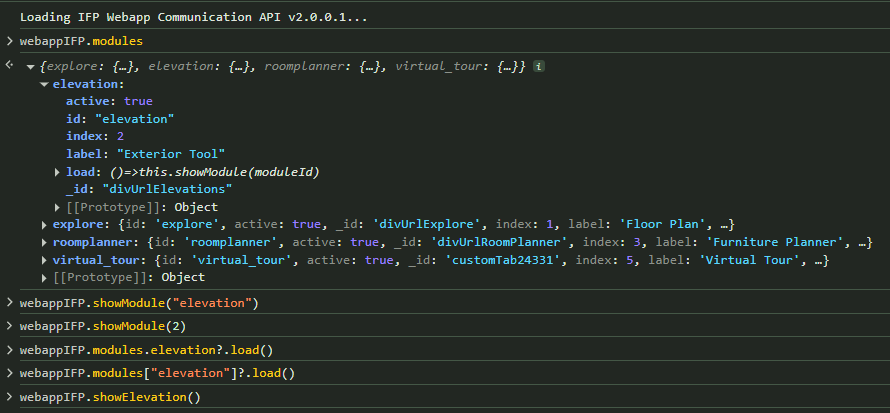
- onModuleChanged(callbackFunc): This function can be called when either the parent or child window wants a callback regarding actual module changes. It will notify both the parent and child windows about the module change.

When a module changes, it provides the following output. In this callback function, we can handle the module change according to our requirements.

¶ Module Types
The API defines several module types via ZONDA.IFP.MODULE:
- FLOORPLAN / EXPLORE: Represents the floorplan view ("explore").
- ELEVATION: Represents the elevation view.
- ROOM_PLANNER: Represents the room planner view.
- ROOM_DESIGNER: Represents the room designer view.
- CUSTOM: Represents a custom tab module. Use module tab
- DEFAULT: Represents a default module FLOORPLAN.
These module types can be used with methods like showModule(moduleId) or retrieved via getModules().
¶ Return Modules list.
¶ Message IDs
The API returns the following message IDs in responses:
- S_002: "IFP API connected to [ifpIframe]."
- S_003: "IFP API connected to [ifpIframe]. IFP webapp loaded in 1.712 seconds!"
- E_001: "IFrame [ifpIframe] doesn't exist."
- E_002: "The connection with the IFP application is not established"
- E_003: "IFP is not ready yet!"
- E_005: "Invalid origin: [Parent Origin]"
- E_006: "IFrame [ifpIframe] is not an IFrame"
- E_007: "IFP Api trying to connect to a bad webapp."
- E_010: "SessionId or userId is required"
- E_011: "userId is required"
¶ Console Errors
The following error may appear in the console if initialization fails:
- "IFrame [ifpIframe id] doesn't exist.": Indicates that the iframe reference is invalid or missing.

¶ Security Considerations
The following considerations are critical for secure usage of the API
- The API validates the origin of incoming messages using isValidOrigin(event.origin) to ensure secure cross-origin communication.
- Only messages with a matching apiId ('IFP') are processed.
- Developers should ensure the iframe source URL is trusted and properly configured.
- Using multiple IFrame Communication API on the same page should work without conflic even if multiple
Window.postMessage()event are managed in each.
https://apps.zondavirtual.com/demo/webapp_communication/isp_ifp.html
¶ Troubleshooting
Common issues and their solutions:
- Iframe Not Found: Ensure the iframe ID or DOM reference is correct. Check for typos or timing issues (e.g., referencing the iframe before it is added to the DOM).
- Connection Issues: Verify that the IFP webapp URL is accessible and that the parent page and iframe are served over HTTPS to avoid mixed content errors.
- Callback Not Triggered: Ensure the callback function is properly defined and that the IFP webapp has finished loading.
¶ Version History
- 2.2 : onModuleChanged function has been added to notify both the parent and child windows.
- 2.1 : showModule function modification
- showModule function updated to support - Module ID, Module Index, Inbuilt functions as mentioned above.
- 2.0 : Current version, supporting all features described above.
- Initial Release
- 1.0